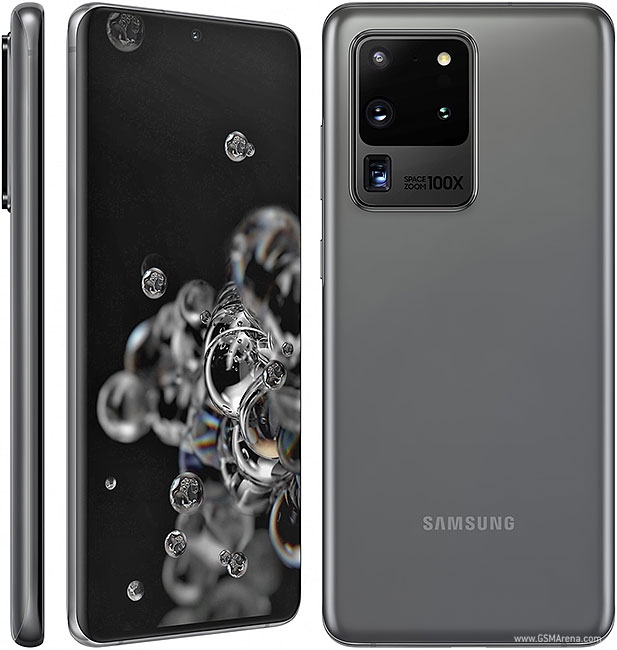
The Galaxy S20 flagship family was finally launched on 11th February 2020 with the S20 Ultra having all the bells and whistles one would wish for. The S20 Ultra being the years highlight with the previously launched 108MP ISOCELL bright HMX sensor (announced in August) which is a Quad Bayer sensor
Samsung calls it “Tetra Cell”, meaning a group of four pixels shares one color filter. This allows the image processing algorithms to merge four 0.8µm pixels into one 1.6µm pixel with superior light gathering ability. Even after the 4:1 conversion, the resulting image has pretty high resolution of 27MP.
In the daytime, the algorithms go the other way and rearrange the pixel data so that it results in a 108MP shot – this is the first mobile sensor to go north of 100MP. At 1/1.33”, this is also one of the largest mobile sensors ever.
***see pixel binning/quad vayer filters at the bottom of this page to see a post I wrote on the aforementioned
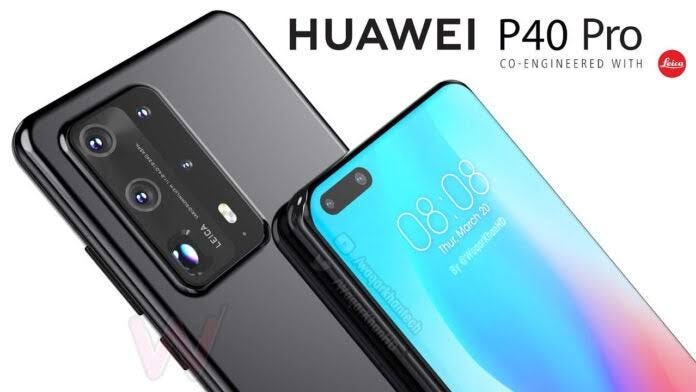
Huawei P40 Pro expected design render
That being said, Huawei’s flagship P40 pro is scheduled to launch early March. Famously known for their high end photography, everyone is probably anticipating how Huawei will answer Samsung’s insane camera upgrade with the Galaxy S20 Ultra and it’s beastly camera specs.
It looks like Huawei does have something to counter the Galaxy S20 Ultra. According to the latest reports , Huawei will use Sony’s new 52MP IMX 700 image sensor on the P40 pro. The resolution is 52MP so it’s somewhat half what Samsung’s offering with the S20 Ultra but that isn’t the fun part. Sony is adopting a large 1/1.33″ sensor area similar to Samsung’s camera sensor but the thing is it has 16 in 1 pixel binning tech resulting in pixel sizes of 2.4 microns. Sony’s sensor has doubled pixel sizes which will help in low light performance in theory.
P40 pro is also gonna feature an advantage in the zoom area. Samsung is using 5X optical zoom combining it with the 48MP telephoto cam 2 give 10X optic hybrid zoom which can also do 100X digital zoom. It’s not purely 10X zoom, it’s a mixture of optical lens and pixels. Huawei on the other hand is expected to use pure 10X optical zoom. The Huawei’s is gonna have an advantage here but again I can’t that for sure until I watch the YouTube reviews of the P40 pro and S20 Ultra( I can’t afford any of these devices, at least not now😂😂)
Mayson is a communication and media technology student with a passion for tech and automobiles including all surrounding factors of the aforementioned
Pixel binning is the process of combining the electric charge from adjacent CMOS or CCD sensor pixels into one super-pixel, to reduce noise by increasing the signal-to-noise ratio in digital cameras.
Typically, the binning happens on groups of four pixels that form a quad (see image) but some sensors can merge a block of up to 4×4 pixels (16 pixels) instead of 2×2 (4 pixels). By doing this, the sensor is increasing the relative sensitivity by 4 (signal to noise ratio), but also reducing the (spacial) resolution by 4. The combined pixels are sometimes called “super-pixels.”
What is the purpose of binning?
The reason for being of binning is to increase the signal-to-noise ratio (SNR or noise reduction), a key metric in analog applications (such as image sensing). In modern camera, this is particularly useful to obtain higher brightness in extreme low-light conditions.
Note that some sensors do average binning, rather than additive binning. It is a different way of getting a better signal to noise ratio, so both techniques lead to a similar goal. It’s not always clear which is the best, and it depends on the context.
With less noise from the analog data, the image can be subjected to higher levels of gains/amplifications during the post-processing phase. This will also offer an opportunity to obtain higher quality low-light images.
How a normal camera would produce the image How pixel binning improves the photo
Where does camera noise come from?
Binning dramatically helps reduce noise, but where does noise come from to start with? Mainly 3 possible sources:
Shot noise
light captured by the sensor and converted to electron charges
Read noise
when we read the sensor’s data while converting from analog to digital
Thermal noise
electrons released by the sensor itself. Longer exposures create more heat
In general, Read Noise is negligible, so it’s not a real factor for consumer applications. Thermal noise is not an issue for regular photo ops, and we’ve never seen it become an issue even when recording video. Therefore the Shot Noise is the main issue that binning is designed to address.
Does it work?
Yes, as the research suggests, Pixel Binning (aka 4-in-1 pixel as some OEMs call it) does have some tangible benefits. However, it depends how it is implemented. For example, the LG G7 which is using pixel binning on a 16 MP sensor, ends up with 4 MP photos, which feature less details than alternative solutions (a large sensor and aperture)
The Huawei P20 Pro opts for an extremely large sensor (for a phone) and a 40MP pixel resolution, so when binning is used, the final photo resolution is 10 MP, which is a much better trade-off than 4MP.
In theory, Pixel binning is a great solution to have high megapixel count in bright photo conditions, and great low-light sensitivity. In reality, it does bring some benefits, but not a crushing blow to those that don’t use it. What we know, is that more mobile cameras will include this technique in their photo toolbox.
Mayson is a communication and media technology student with a passion for tech and automobiles including all surrounding factors of the aforementioned
Personally, I agree with 300 DPI as an upper limit. I have somewhat better than 20:20 vision and I use two Android smartphones with 5″-diagonal screens, both IPS LCDs: an older higher-end phone with a 1920×1080 display, and a newer low-end one with a 1280×720 display. I do not perceive any difference between them unless I squint very hard at graphics contrived to identify pixel-level features.
Did I say there’s no difference at all between 720p and 1080p smartphone displays? Not quite true…
a 720p display is cheaper to manufacture,
a 720p display uses less power on multiple levels: less CPU/GPU power to draw ~55% fewer pixels, 55% less RAM to store a frame buffer, slightly simpler driving circuitry overall, and perhaps most importantly…
a 720p display can achieve comparable brightness with a lower level of backlight power because less of the screen area is occupied by the dark mask or grid separating adjacent pixels, which is necessary to form a sharp image with most types of screens.
In summary: 720p displays are superior for smartphone-sized screens. 1080p displays are a waste of money and a waste of battery life for no perceptible effect.
I’m surprised no major smartphone manufacturer has come out and marketed a smartphone with a 720p display by trumpeting all of the aforementioned virtues of a screen with an appropriate resolution. ¯\_(ツ)_/¯
The difference is basically of the pixel density of the display. Let’s consider a phone with screen size of 5″. If it’s a 720p display then the number of pixels along the length will be 1280 and along the width would be 720. Thus giving a pixel density of approx 330 ppi.
If the same display then was to have a resolution of 1080p then the pixels would be 1920×1080. This giving a pixel density of approx 440 ppi. The higer number of ppi makes the display look more sharp, detailed and undistorted.
The other difference it would make will be in the resolution of the screenshot. The resolution of screenshot will be same as that of the display. If the size of the screen increases them the pixel density will reduce keeping in mind the fact that number of pixels across the display are the same.
Screen resolution and display size: are we there yet?
Let’s first start with the iPhone 4, a smartphone that first claimed it comes with a ‘Retina’ display so sharp that the eye of a regular person no longer sees jagged pixels. The iPhone 4 was a device with a resolution of 640 x 960 pixels, but resolution alone does not tell us much about the sharpness of the display itself. After all, if you put the same resolution that looks clear on the iPhone on a 50-inch screen it would suddenly start looking not sharp at all. So instead of looking at resolution alone, it makes much more sense to look at a metric like pixel density, calculated using both screen size AND resolution.
The iPhone 4, for instance, featured pixel density of 326 pixels per inch (ppi, but some would also say dots per inch, or dpi).
Not long after, though, higher resolutions and pixel densities started to appear. Here are the pixel densities of some popular phones since then:
Apple iPhone 4-5s: 326ppi
Samsung Galaxy S3 (4.8-inch, 720p): 306ppi
Samsung Galaxy S4 (5-inch, 1080p): 441ppi
Samsung Galaxy Note III (5.7-inch, 1080p): 386ppi
By looking at these different phones, we can again see how screens with the same resolution have different pixel densities, and thus different sharpness.
Back in the day when Apple unveiled the iPhone 4, various reports suggested that anything above roughly 300ppi is good enough for the human eye to perceive as clear and sharp. Why then screen resolutions continued growing and growing until present-day Quad HD devices?
The latest Quad HD smartphones come (or are expected to arrive) with a pixel density as high as (the seemingly unnecessary) 534ppi! Is it really just new technology for nothing?
The third factor: viewing distance
There is another key factor that should be considered when we speak about display sharpness and clarity, though, but it’s often left out of the conversation. We’re speaking about viewing distance. Even the sharpest of TVs and the sharpest of phones starts to look flawed when you look at it from a very close distance. Look at the same device from a 1-foot distance and the clarity of the picture suddenly becomes better. Look at it from further away, and the picture would appear perfectly sharp and clear.
The question that we will answer today then is: at what viewing distance one starts actually seeing the benefit of high-res displays?
The ideal viewing distance
To measure the ideal distance between you and your smartphone display, we’ll assume you are one of the rare few who have very good vision. You’d often hear about such vision being called 20/20 vision. A person with 20/20 vision is one who can discern detail of 1 arc minute (1 arc minute = 1/60 of a degree = a circle has 360 degrees, so 1 arc minute = 1/21600th of a full circle). Most people have worse vision than that – for instance someone with 20/40 vision can only discern detail of 2 arc minutes, while the rear few (think jet pilots) with 20/10 vision can discern detail of 0.5 arc minutes. The actual limit of human vision is around 20/8, so again, we’re assuming a fairly optimistic 20/20 vision scenario.
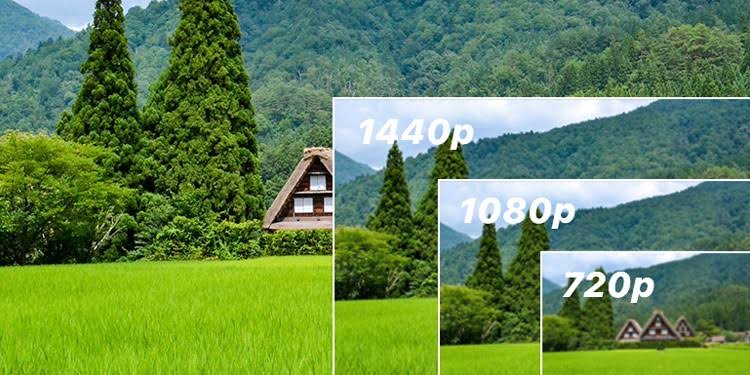
So with all that in mind, how close do you need to be start seeing those pixels and details on even a Quad HD smartphone? And what about 1080p phones, and 720p devices? Take a look below:
Typical 480p phone (4” display like Galaxy S III Mini): eye starts to notice pixelization from 14.73” (37.4cm)
Typical 720p phone (4.7” display like Nexus 4): eye starts to notice pixelization from 11” (28cm)
Typical 1080p phone (5” display like Galaxy S5): eye starts to notice pixelization from 7.8” (19.8cm)
Typical 1440p phone (5.5” display like expected LG G3): eye starts to notice pixelization from 6.44” (16.4cm)
480p, average person starts noticing pixelization at around 14.7 inches (here – 37.4cm) in a 4-inch 480p phone
720p, average person starts noticing pixelization at around 11 inches in a 4.7-inch 720p phone
1080p, average person starts noticing pixelization at around 7.8 inches in a 5-inch 1080p phone
Quad HD, average person starts noticing pixelization at around 6.44 inches in a 5.5-inch 1440p phone
*I’ve used the following formulas to calculate those distances:
VIEWING DISTANCE = 1 / PPI / (2 * Tan (VISUAL RESOLUTION / 2)) PPI = X / sqrt (W ^ 2 / ((Y / X) ^ 2 + 1))), where x = horizontal resolution, y = vertical resolution, w = screen size VISUAL RESOLUTION = (1 / VISUAL ACCUITY) * (1 / 60) We’ve assumed 20/20 VISUAL ACCUITY
Conclusion
In conclusion, I ought to put a few disclaimers to all this. I’ve tried to keep it as scientifically accurate as possible, but we ought to remember that our eyes and our human vision is more complex and the actual way we see things is a lot about how the brain processes images. And that’s something that is hard to measure right now. With this in mind, I’ll lay it out in very simple terms: theoretically, you need to look at your 5.5-inch Quad HD from as close as 6.4″ for your eyes to start noticing pixelization (if you have 20/20 vision, if not you’d need it even close). At regular viewing distances it’s practically impossible to notice the difference in sharpness between say the 1080p Galaxy S5 and the future Quad HD flagships. Not very encouraging, is it. Stay tuned for more reviews, how to’s and much more.
8
Mayson is a communication and media technology student with a passion for tech and automobiles including all surrounding factors of the aforementioned



 Mays Tech Talk